See the boundary.
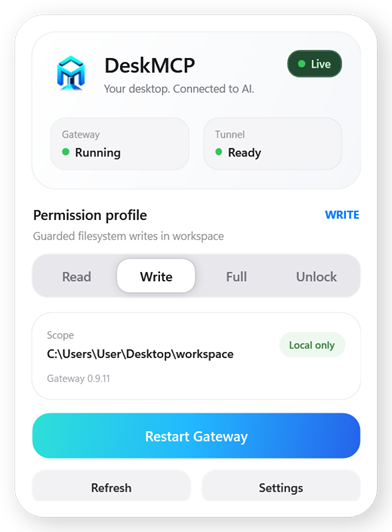
Gateway health, Tunnel status, Workspace, permission profile and the Agent Desktop pool are visible in one native control surface.
 DeskMCP
Download
DeskMCP
Download
DeskMCP gives ChatGPT a controlled path to Windows files, owned terminal sessions, Windows UI, isolated Browser Automation and multi-agent virtual desktops — while permission decisions and UAC approval stay on your machine.
Most bridges hide the dangerous part: what can actually touch your machine. DeskMCP puts that decision in front of you.
Gateway health, Tunnel status, Workspace, permission profile and the Agent Desktop pool are visible in one native control surface.
Move deliberately from Read to Write, Full or Unlock. Higher-risk profiles are explicit and session-owned.
The Tunnel transports requests. DeskMCP still decides locally whether filesystem, process, Browser Automation or Windows Computer Use is allowed.
One glance tells you whether the bridge is alive, which profile is active, what Workspace is in scope, whether your Tunnel is ready, and which Agent Desktops are available.
window_mode: "visible"runas + UAC for hidden or visible admin processesAgent Desktop, Browser Automation and Computer Use stay behind local policy and lease/observation checks; visible consoles still receive keyboard input directly from their Windows window.
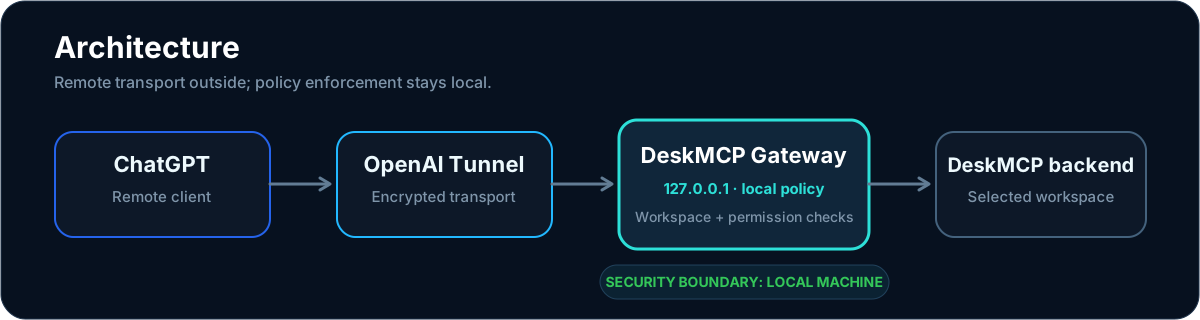
The Gateway HTTP service binds to 127.0.0.1.
Read, Write and Full enforce canonical path boundaries before forwarding work.
Hidden, visible and elevated consoles stay attached to DeskMCP-owned process trees instead of arbitrary Windows PID control.
Administrator processes use Windows runas and still require local approval whether their console is hidden or visible. DeskMCP does not bypass UAC.
Agent Desktop, Browser Automation and Windows Computer Use stay behind lease, observation and local permission checks.
No file contents, secrets, terminal I/O or real PIDs in audit logs.
No Node.js, npm, .NET SDK, Git or source checkout required for the public Windows installer.
Run Setup and choose the Workspace DeskMCP may access.
Paste the Tunnel ID and Runtime API Key into First Run.
Reuse the existing DeskMCP plugin if present; otherwise create it with Tunnel + No auth, then confirm all 27 DeskMCP tools.
Choose the installer that matches your Windows architecture.
Windows builds are currently unsigned while Authenticode signing remains pending, so SmartScreen may show an Unknown Publisher warning.